---
title: Netty入门-第三话
tags:
- Netty
categories:
- Netty
- 入门
keywords: Netty
description: 对前面两话一些迷惑的点进行细说,讲解handler调用机制,TCP粘包,以及用netty写一个十分简单的RPC。
cover: 'https://npm.elemecdn.com/lql_static@latest/logo/netty_logo.jpg'
abbrlink: 429acc6d
date: 2021-04-21 17:38:58
---
> 尚硅谷的源码部分暂时不再记录笔记,因为我觉得源码这东西,韩老师讲的不太好,弹幕和评论也有说。源码这东西,先把入门的消化一下,然后通过书或者博客来看源码会比较好,你只有先会用,看源码才会有感觉。
# Google Protobuf
## 编码和解码的基本介绍
1. 编写网络应用程序时,因为数据在网络中传输的都是二进制字节码数据,在发送数据时就需要编码,接收数据时就需要解码[示意图]
2. `codec`(编解码器)的组成部分有两个:`decoder`(解码器)和 `encoder`(编码器)。`encoder` 负责把业务数据转换成字节码数据,`decoder` 负责把字节码数据转换成业务数据
 ## Netty 本身的编码解码的机制和问题分析
1. `Netty` 自身提供了一些 `codec`(编解码器)
2. `Netty` 提供的编码器
- `StringEncoder`:对字符串数据进行编码。
- `ObjectEncoder`:对Java对象进行编码。
3. `Netty` 提供的解码器
- `StringDecoder`,对字符串数据进行解码
- `ObjectDecoder`,对 Java 对象进行解码
4. `Netty` 本身自带的 `ObjectDecoder` 和 `ObjectEncoder` 可以用来实现 `POJO` 对象或各种业务对象的编码和解码,底层使用的仍是Java序列化技术,而Java序列化技术本身效率就不高,存在如下问题
- 无法跨语言
- 序列化后的体积太大,是二进制编码的5倍多。
- 序列化性能太低
5. 引出新的解决方案[`Google` 的 `Protobuf`]
## Protobuf
1. `Protobuf` 基本介绍和使用示意图
2. `Protobuf` 是 `Google` 发布的开源项目,全称 `Google Protocol Buffers`,是一种轻便高效的结构化数据存储格式,可以用于结构化数据串行化,或者说序列化。它很适合做数据存储或 `RPC` [远程过程调用 `remote procedure call` ]数据交换格式。目前很多公司 从`http + json 转向tcp + protobuf`,效率会更高。
3. 参考文档:https://developers.google.com/protocol-buffers/docs/proto 语言指南
4. `Protobuf` 是以 `message` 的方式来管理数据的.
5. 支持跨平台、跨语言,即[客户端和服务器端可以是不同的语言编写的](支持目前绝大多数语言,例如 `C++`、`C#`、`Java`、`python` 等)
6. 高性能,高可靠性
7. 使用 `protobuf` 编译器能自动生成代码,`Protobuf` 是将类的定义使用 `.proto` 文件进行描述。说明,在 `idea` 中编写 `.proto` 文件时,会自动提示是否下载 `.ptoto` 编写插件.可以让语法高亮。
8. 然后通过 `protoc.exe` 编译器根据 `.proto` 自动生成 `.java` 文件
9. `protobuf` 使用示意图
## Netty 本身的编码解码的机制和问题分析
1. `Netty` 自身提供了一些 `codec`(编解码器)
2. `Netty` 提供的编码器
- `StringEncoder`:对字符串数据进行编码。
- `ObjectEncoder`:对Java对象进行编码。
3. `Netty` 提供的解码器
- `StringDecoder`,对字符串数据进行解码
- `ObjectDecoder`,对 Java 对象进行解码
4. `Netty` 本身自带的 `ObjectDecoder` 和 `ObjectEncoder` 可以用来实现 `POJO` 对象或各种业务对象的编码和解码,底层使用的仍是Java序列化技术,而Java序列化技术本身效率就不高,存在如下问题
- 无法跨语言
- 序列化后的体积太大,是二进制编码的5倍多。
- 序列化性能太低
5. 引出新的解决方案[`Google` 的 `Protobuf`]
## Protobuf
1. `Protobuf` 基本介绍和使用示意图
2. `Protobuf` 是 `Google` 发布的开源项目,全称 `Google Protocol Buffers`,是一种轻便高效的结构化数据存储格式,可以用于结构化数据串行化,或者说序列化。它很适合做数据存储或 `RPC` [远程过程调用 `remote procedure call` ]数据交换格式。目前很多公司 从`http + json 转向tcp + protobuf`,效率会更高。
3. 参考文档:https://developers.google.com/protocol-buffers/docs/proto 语言指南
4. `Protobuf` 是以 `message` 的方式来管理数据的.
5. 支持跨平台、跨语言,即[客户端和服务器端可以是不同的语言编写的](支持目前绝大多数语言,例如 `C++`、`C#`、`Java`、`python` 等)
6. 高性能,高可靠性
7. 使用 `protobuf` 编译器能自动生成代码,`Protobuf` 是将类的定义使用 `.proto` 文件进行描述。说明,在 `idea` 中编写 `.proto` 文件时,会自动提示是否下载 `.ptoto` 编写插件.可以让语法高亮。
8. 然后通过 `protoc.exe` 编译器根据 `.proto` 自动生成 `.java` 文件
9. `protobuf` 使用示意图
 ## Protobuf 快速入门实例
编写程序,使用 `Protobuf` 完成如下功能
1. 客户端可以发送一个 `StudentPoJo` 对象到服务器(通过 `Protobuf` 编码)
2. 服务端能接收 `StudentPoJo` 对象,并显示信息(通过 `Protobuf` 解码)
```maven
com.google.protobuf
protobuf-java
3.6.1
```
### Student.proto
```protobuf
syntax = "proto3"; //版本
option java_outer_classname = "StudentPOJO";//生成的外部类名,同时也是文件名
//protobuf 使用message 管理数据
message Student { //会在 StudentPOJO 外部类生成一个内部类 Student, 他是真正发送的POJO对象
int32 id = 1; // Student 类中有 一个属性 名字为 id 类型为int32(protobuf类型) 1表示属性序号,不是值
string name = 2;
}
```
编译
protoc.exe --java_out=.Student.proto
将生成的 StudentPOJO 放入到项目使用
## Protobuf 快速入门实例
编写程序,使用 `Protobuf` 完成如下功能
1. 客户端可以发送一个 `StudentPoJo` 对象到服务器(通过 `Protobuf` 编码)
2. 服务端能接收 `StudentPoJo` 对象,并显示信息(通过 `Protobuf` 解码)
```maven
com.google.protobuf
protobuf-java
3.6.1
```
### Student.proto
```protobuf
syntax = "proto3"; //版本
option java_outer_classname = "StudentPOJO";//生成的外部类名,同时也是文件名
//protobuf 使用message 管理数据
message Student { //会在 StudentPOJO 外部类生成一个内部类 Student, 他是真正发送的POJO对象
int32 id = 1; // Student 类中有 一个属性 名字为 id 类型为int32(protobuf类型) 1表示属性序号,不是值
string name = 2;
}
```
编译
protoc.exe --java_out=.Student.proto
将生成的 StudentPOJO 放入到项目使用
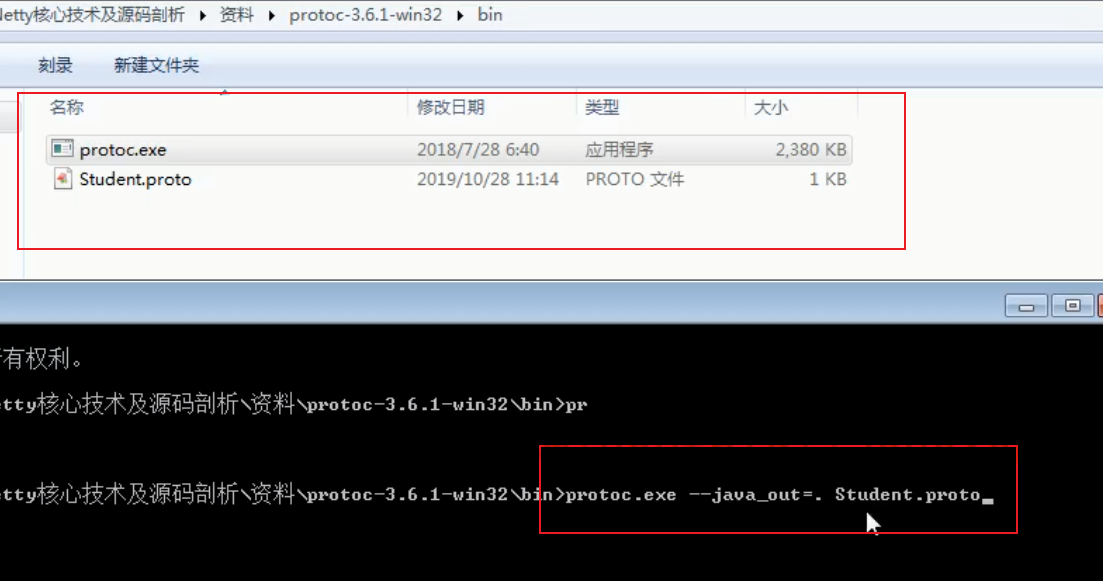 生成的StudentPOJO代码太长就不贴在这里了
### NettyServer
```java
package com.atguigu.netty.codec;
import io.netty.bootstrap.ServerBootstrap;
import io.netty.channel.*;
import io.netty.channel.nio.NioEventLoopGroup;
import io.netty.channel.socket.SocketChannel;
import io.netty.channel.socket.nio.NioServerSocketChannel;
import io.netty.handler.codec.protobuf.ProtobufDecoder;
public class NettyServer {
public static void main(String[] args) throws Exception {
//创建BossGroup 和 WorkerGroup
//说明
//1. 创建两个线程组 bossGroup 和 workerGroup
//2. bossGroup 只是处理连接请求 , 真正的和客户端业务处理,会交给 workerGroup完成
//3. 两个都是无限循环
//4. bossGroup 和 workerGroup 含有的子线程(NioEventLoop)的个数
// 默认实际 cpu核数 * 2
EventLoopGroup bossGroup = new NioEventLoopGroup(1);
EventLoopGroup workerGroup = new NioEventLoopGroup(); //8
try {
//创建服务器端的启动对象,配置参数
ServerBootstrap bootstrap = new ServerBootstrap();
//使用链式编程来进行设置
bootstrap.group(bossGroup, workerGroup) //设置两个线程组
.channel(NioServerSocketChannel.class) //使用NioSocketChannel 作为服务器的通道实现
.option(ChannelOption.SO_BACKLOG, 128) // 设置线程队列得到连接个数
.childOption(ChannelOption.SO_KEEPALIVE, true) //设置保持活动连接状态
// .handler(null) // 该 handler对应 bossGroup , childHandler 对应 workerGroup
.childHandler(new ChannelInitializer() {//创建一个通道初始化对象(匿名对象)
//给pipeline 设置处理器
@Override
protected void initChannel(SocketChannel ch) throws Exception {
ChannelPipeline pipeline = ch.pipeline();
//在pipeline加入ProtoBufDecoder
//指定对哪种对象进行解码
pipeline.addLast("decoder", new ProtobufDecoder(StudentPOJO.Student.getDefaultInstance()));
pipeline.addLast(new NettyServerHandler());
}
}); // 给我们的workerGroup 的 EventLoop 对应的管道设置处理器
System.out.println(".....服务器 is ready...");
//绑定一个端口并且同步, 生成了一个 ChannelFuture 对象
//启动服务器(并绑定端口)
ChannelFuture cf = bootstrap.bind(6668).sync();
//给cf 注册监听器,监控我们关心的事件
cf.addListener(new ChannelFutureListener() {
@Override
public void operationComplete(ChannelFuture future) throws Exception {
if (cf.isSuccess()) {
System.out.println("监听端口 6668 成功");
} else {
System.out.println("监听端口 6668 失败");
}
}
});
//对关闭通道进行监听
cf.channel().closeFuture().sync();
}finally {
bossGroup.shutdownGracefully();
workerGroup.shutdownGracefully();
}
}
}
```
### NettyServerHandler
```java
package com.atguigu.netty.codec;
import io.netty.buffer.ByteBuf;
import io.netty.buffer.Unpooled;
import io.netty.channel.*;
import io.netty.util.CharsetUtil;
/*
说明
1. 我们自定义一个Handler 需要继续netty 规定好的某个HandlerAdapter(规范)
2. 这时我们自定义一个Handler , 才能称为一个handler
*/
//public class NettyServerHandler extends ChannelInboundHandlerAdapter {
public class NettyServerHandler extends SimpleChannelInboundHandler {
//读取数据实际(这里我们可以读取客户端发送的消息)
/*
1. ChannelHandlerContext ctx:上下文对象, 含有 管道pipeline , 通道channel, 地址
2. Object msg: 就是客户端发送的数据 默认Object
*/
@Override
public void channelRead0(ChannelHandlerContext ctx, StudentPOJO.Student msg) throws Exception {
//读取从客户端发送的StudentPojo.Student
System.out.println("客户端发送的数据 id=" + msg.getId() + " 名字=" + msg.getName());
}
//数据读取完毕
@Override
public void channelReadComplete(ChannelHandlerContext ctx) throws Exception {
//writeAndFlush 是 write + flush
//将数据写入到缓存,并刷新
//一般讲,我们对这个发送的数据进行编码
ctx.writeAndFlush(Unpooled.copiedBuffer("hello, 客户端~(>^ω^<)喵1", CharsetUtil.UTF_8));
}
//处理异常, 一般是需要关闭通道
@Override
public void exceptionCaught(ChannelHandlerContext ctx, Throwable cause) throws Exception {
ctx.close();
}
}
```
### NettyClient
```java
package com.atguigu.netty.codec;
import io.netty.bootstrap.Bootstrap;
import io.netty.channel.ChannelFuture;
import io.netty.channel.ChannelInitializer;
import io.netty.channel.ChannelPipeline;
import io.netty.channel.EventLoopGroup;
import io.netty.channel.nio.NioEventLoopGroup;
import io.netty.channel.socket.SocketChannel;
import io.netty.channel.socket.nio.NioSocketChannel;
import io.netty.handler.codec.protobuf.ProtobufEncoder;
public class NettyClient {
public static void main(String[] args) throws Exception {
//客户端需要一个事件循环组
EventLoopGroup group = new NioEventLoopGroup();
try {
//创建客户端启动对象
//注意客户端使用的不是 ServerBootstrap 而是 Bootstrap
Bootstrap bootstrap = new Bootstrap();
//设置相关参数
bootstrap.group(group) //设置线程组
.channel(NioSocketChannel.class) // 设置客户端通道的实现类(反射)
.handler(new ChannelInitializer() {
@Override
protected void initChannel(SocketChannel ch) throws Exception {
ChannelPipeline pipeline = ch.pipeline();
//在pipeline中加入 ProtoBufEncoder
pipeline.addLast("encoder", new ProtobufEncoder());
pipeline.addLast(new NettyClientHandler()); //加入自己的处理器
}
});
System.out.println("客户端 ok..");
//启动客户端去连接服务器端
//关于 ChannelFuture 要分析,涉及到netty的异步模型
ChannelFuture channelFuture = bootstrap.connect("127.0.0.1", 6668).sync();
//给关闭通道进行监听
channelFuture.channel().closeFuture().sync();
}finally {
group.shutdownGracefully();
}
}
}
```
### NettyClientHandler
```java
package com.atguigu.netty.codec;
import io.netty.buffer.ByteBuf;
import io.netty.buffer.Unpooled;
import io.netty.channel.ChannelHandlerContext;
import io.netty.channel.ChannelInboundHandlerAdapter;
import io.netty.util.CharsetUtil;
public class NettyClientHandler extends ChannelInboundHandlerAdapter {
//当通道就绪就会触发该方法
@Override
public void channelActive(ChannelHandlerContext ctx) throws Exception {
//发生一个Student 对象到服务器
StudentPOJO.Student student = StudentPOJO.Student.newBuilder().setId(4).setName("智多星 吴用").build();
//Teacher , Member ,Message
ctx.writeAndFlush(student);
}
//当通道有读取事件时,会触发
@Override
public void channelRead(ChannelHandlerContext ctx, Object msg) throws Exception {
ByteBuf buf = (ByteBuf) msg;
System.out.println("服务器回复的消息:" + buf.toString(CharsetUtil.UTF_8));
System.out.println("服务器的地址: "+ ctx.channel().remoteAddress());
}
@Override
public void exceptionCaught(ChannelHandlerContext ctx, Throwable cause) throws Exception {
cause.printStackTrace();
ctx.close();
}
}
```
## Protobuf 快速入门实例 2
1. 编写程序,使用 `Protobuf` 完成如下功能
2. 客户端可以随机发送 `StudentPoJo` / `WorkerPoJo` 对象到服务器(通过 `Protobuf` 编码)
3. 服务端能接收 `StudentPoJo` / `WorkerPoJo` 对象(需要判断是哪种类型),并显示信息(通过 `Protobuf` 解码)
### proto
```protobuf
syntax = "proto3";
option optimize_for = SPEED; // 加快解析
option java_package="com.atguigu.netty.codec2"; //指定生成到哪个包下
option java_outer_classname="MyDataInfo"; // 外部类名, 文件名
/*
1.protobuf 可以使用message 管理其他的message。最终决定使用哪一个message作为传输对象
2.假设你某个项目需要传输20个对象,你不可能新建20个proto文件吧。此时你就可以
在一个文件里定义20个message,最后再用一个总的message(比方说这里的MyMessage)
来决定在实际传输时真正需要传输哪一个对象
3.因为你实际传输的时候大部分情况传输的都是一个对象,所以下面用oneof进行了限制
4.是否可以传多个对象呢?我个人认为是可以的,比如可以通过map(目前我也不太了解proto的语法)
*/
message MyMessage {
//定义一个枚举类型,DataType如果是0则表示一个Student对象实例,DataType这个名称自定义
enum DataType {
StudentType = 0; //在proto3 要求enum的编号从0开始
WorkerType = 1;
}
//用data_type 来标识传的是哪一个枚举类型,这里才真正开始定义MyMessage的数据类型
DataType data_type = 1; //所有后面的数字都只是编号而已
/*
1.oneof关键字 表示每次枚举类型进行传输时,限制最多只能传输一个对象。
dataBody名称也是自定义的
2.为什么这里的序号是2呢?因为上面DataType data_type = 1 占了第一个序号了
3.MyMessage里真正出现的类型只有两个
①DataType类型
②Student类型或者Worker类型(这两个在真正传输的时候只会有一个出现)
*/
oneof dataBody {
Student student = 2; //注意这后面的数字也都只是编号而已
Worker worker = 3;
}
}
message Student {
int32 id = 1;//Student类的属性
string name = 2; //
}
message Worker {
string name=1;
int32 age=2;
}
```
### NettyServer
```java
package com.atguigu.netty.codec2;
import com.atguigu.netty.codec.StudentPOJO;
import io.netty.bootstrap.ServerBootstrap;
import io.netty.channel.*;
import io.netty.channel.nio.NioEventLoopGroup;
import io.netty.channel.socket.SocketChannel;
import io.netty.channel.socket.nio.NioServerSocketChannel;
import io.netty.handler.codec.protobuf.ProtobufDecoder;
public class NettyServer {
public static void main(String[] args) throws Exception {
EventLoopGroup bossGroup = new NioEventLoopGroup(1);
EventLoopGroup workerGroup = new NioEventLoopGroup(); //8
try {
//创建服务器端的启动对象,配置参数
ServerBootstrap bootstrap = new ServerBootstrap();
//使用链式编程来进行设置
bootstrap.group(bossGroup, workerGroup) //设置两个线程组
.channel(NioServerSocketChannel.class) //使用NioSocketChannel 作为服务器的通道实现
.option(ChannelOption.SO_BACKLOG, 128) // 设置线程队列得到连接个数
.childOption(ChannelOption.SO_KEEPALIVE, true) //设置保持活动连接状态
// .handler(null) // 该 handler对应 bossGroup , childHandler 对应 workerGroup
.childHandler(new ChannelInitializer() {//创建一个通道初始化对象(匿名对象)
//给pipeline 设置处理器
@Override
protected void initChannel(SocketChannel ch) throws Exception {
ChannelPipeline pipeline = ch.pipeline();
//在pipeline加入ProtoBufDecoder
//指定对哪种对象进行解码
pipeline.addLast("decoder", new ProtobufDecoder(MyDataInfo.MyMessage.getDefaultInstance()));
pipeline.addLast(new NettyServerHandler());
}
}); // 给我们的workerGroup 的 EventLoop 对应的管道设置处理器
System.out.println(".....服务器 is ready...");
//绑定一个端口并且同步, 生成了一个 ChannelFuture 对象
//启动服务器(并绑定端口)
ChannelFuture cf = bootstrap.bind(6668).sync();
//给cf 注册监听器,监控我们关心的事件
cf.addListener(new ChannelFutureListener() {
@Override
public void operationComplete(ChannelFuture future) throws Exception {
if (cf.isSuccess()) {
System.out.println("监听端口 6668 成功");
} else {
System.out.println("监听端口 6668 失败");
}
}
});
//对关闭通道进行监听
cf.channel().closeFuture().sync();
}finally {
bossGroup.shutdownGracefully();
workerGroup.shutdownGracefully();
}
}
}
```
### NettyServerHandler
```java
package com.atguigu.netty.codec2;
import com.atguigu.netty.codec.StudentPOJO;
import io.netty.buffer.Unpooled;
import io.netty.channel.ChannelHandlerContext;
import io.netty.channel.SimpleChannelInboundHandler;
import io.netty.util.CharsetUtil;
//public class NettyServerHandler extends ChannelInboundHandlerAdapter {
public class NettyServerHandler extends SimpleChannelInboundHandler {
//读取数据实际(这里我们可以读取客户端发送的消息)
/*
1. ChannelHandlerContext ctx:上下文对象, 含有 管道pipeline , 通道channel, 地址
2. Object msg: 就是客户端发送的数据 默认Object
*/
@Override
public void channelRead0(ChannelHandlerContext ctx, MyDataInfo.MyMessage msg) throws Exception {
//根据dataType 来显示不同的信息
MyDataInfo.MyMessage.DataType dataType = msg.getDataType();
if(dataType == MyDataInfo.MyMessage.DataType.StudentType) {
MyDataInfo.Student student = msg.getStudent();
System.out.println("学生id=" + student.getId() + " 学生名字=" + student.getName());
} else if(dataType == MyDataInfo.MyMessage.DataType.WorkerType) {
MyDataInfo.Worker worker = msg.getWorker();
System.out.println("工人的名字=" + worker.getName() + " 年龄=" + worker.getAge());
} else {
System.out.println("传输的类型不正确");
}
}
//数据读取完毕
@Override
public void channelReadComplete(ChannelHandlerContext ctx) throws Exception {
//writeAndFlush 是 write + flush
//将数据写入到缓存,并刷新
//一般讲,我们对这个发送的数据进行编码
ctx.writeAndFlush(Unpooled.copiedBuffer("hello, 客户端~(>^ω^<)喵1", CharsetUtil.UTF_8));
}
//处理异常, 一般是需要关闭通道
@Override
public void exceptionCaught(ChannelHandlerContext ctx, Throwable cause) throws Exception {
ctx.close();
}
}
```
### NettyClient
```java
package com.atguigu.netty.codec2;
import io.netty.bootstrap.Bootstrap;
import io.netty.channel.ChannelFuture;
import io.netty.channel.ChannelInitializer;
import io.netty.channel.ChannelPipeline;
import io.netty.channel.EventLoopGroup;
import io.netty.channel.nio.NioEventLoopGroup;
import io.netty.channel.socket.SocketChannel;
import io.netty.channel.socket.nio.NioSocketChannel;
import io.netty.handler.codec.protobuf.ProtobufEncoder;
public class NettyClient {
public static void main(String[] args) throws Exception {
//客户端需要一个事件循环组
EventLoopGroup group = new NioEventLoopGroup();
try {
//创建客户端启动对象
//注意客户端使用的不是 ServerBootstrap 而是 Bootstrap
Bootstrap bootstrap = new Bootstrap();
//设置相关参数
bootstrap.group(group) //设置线程组
.channel(NioSocketChannel.class) // 设置客户端通道的实现类(反射)
.handler(new ChannelInitializer() {
@Override
protected void initChannel(SocketChannel ch) throws Exception {
ChannelPipeline pipeline = ch.pipeline();
//在pipeline中加入 ProtoBufEncoder
pipeline.addLast("encoder", new ProtobufEncoder());
pipeline.addLast(new NettyClientHandler()); //加入自己的处理器
}
});
System.out.println("客户端 ok..");
//启动客户端去连接服务器端
//关于 ChannelFuture 要分析,涉及到netty的异步模型
ChannelFuture channelFuture = bootstrap.connect("127.0.0.1", 6668).sync();
//给关闭通道进行监听
channelFuture.channel().closeFuture().sync();
}finally {
group.shutdownGracefully();
}
}
}
```
### NettyClientHandler
```java
package com.atguigu.netty.codec2;
import com.atguigu.netty.codec.StudentPOJO;
import io.netty.buffer.ByteBuf;
import io.netty.channel.ChannelHandlerContext;
import io.netty.channel.ChannelInboundHandlerAdapter;
import io.netty.util.CharsetUtil;
import java.util.Random;
public class NettyClientHandler extends ChannelInboundHandlerAdapter {
//当通道就绪就会触发该方法
@Override
public void channelActive(ChannelHandlerContext ctx) throws Exception {
//随机的发送Student 或者 Workder 对象
int random = new Random().nextInt(3);
MyDataInfo.MyMessage myMessage = null;
if(0 == random) { //发送Student 对象
myMessage = MyDataInfo.MyMessage.newBuilder().setDataType(MyDataInfo.MyMessage.DataType.StudentType).setStudent(MyDataInfo.Student.newBuilder().setId(5).setName("玉麒麟 卢俊义").build()).build();
} else { // 发送一个Worker 对象
myMessage = MyDataInfo.MyMessage.newBuilder().setDataType(MyDataInfo.MyMessage.DataType.WorkerType).setWorker(MyDataInfo.Worker.newBuilder().setAge(20).setName("老李").build()).build();
}
ctx.writeAndFlush(myMessage);
}
//当通道有读取事件时,会触发
@Override
public void channelRead(ChannelHandlerContext ctx, Object msg) throws Exception {
ByteBuf buf = (ByteBuf) msg;
System.out.println("服务器回复的消息:" + buf.toString(CharsetUtil.UTF_8));
System.out.println("服务器的地址: "+ ctx.channel().remoteAddress());
}
@Override
public void exceptionCaught(ChannelHandlerContext ctx, Throwable cause) throws Exception {
cause.printStackTrace();
ctx.close();
}
}
```
# Netty 编解码器和 Handler 调用机制
## 基本说明
1. `Netty` 的组件设计:`Netty` 的主要组件有 `Channel`、`EventLoop`、`ChannelFuture`、`ChannelHandler`、`ChannelPipe` 等
2. `ChannelHandler` 充当了处理入站和出站数据的应用程序逻辑的容器。例如,实现 `ChannelInboundHandler` 接口(或 `ChannelInboundHandlerAdapter`),你就可以接收入站事件和数据,这些数据会被业务逻辑处理。当要给客户端发送响应时,也可以从 `ChannelInboundHandler` 冲刷数据。业务逻辑通常写在一个或者多个 `ChannelInboundHandler` 中。`ChannelOutboundHandler` 原理一样,只不过它是用来处理出站数据的
3. `ChannelPipeline` 提供了 `ChannelHandler` 链的容器。以客户端应用程序为例,如果事件的运动方向是从客户端到服务端的,那么我们称这些事件为出站的,即客户端发送给服务端的数据会通过 `pipeline` 中的一系列 `ChannelOutboundHandler`,并被这些 `Handler` 处理,反之则称为入站的
生成的StudentPOJO代码太长就不贴在这里了
### NettyServer
```java
package com.atguigu.netty.codec;
import io.netty.bootstrap.ServerBootstrap;
import io.netty.channel.*;
import io.netty.channel.nio.NioEventLoopGroup;
import io.netty.channel.socket.SocketChannel;
import io.netty.channel.socket.nio.NioServerSocketChannel;
import io.netty.handler.codec.protobuf.ProtobufDecoder;
public class NettyServer {
public static void main(String[] args) throws Exception {
//创建BossGroup 和 WorkerGroup
//说明
//1. 创建两个线程组 bossGroup 和 workerGroup
//2. bossGroup 只是处理连接请求 , 真正的和客户端业务处理,会交给 workerGroup完成
//3. 两个都是无限循环
//4. bossGroup 和 workerGroup 含有的子线程(NioEventLoop)的个数
// 默认实际 cpu核数 * 2
EventLoopGroup bossGroup = new NioEventLoopGroup(1);
EventLoopGroup workerGroup = new NioEventLoopGroup(); //8
try {
//创建服务器端的启动对象,配置参数
ServerBootstrap bootstrap = new ServerBootstrap();
//使用链式编程来进行设置
bootstrap.group(bossGroup, workerGroup) //设置两个线程组
.channel(NioServerSocketChannel.class) //使用NioSocketChannel 作为服务器的通道实现
.option(ChannelOption.SO_BACKLOG, 128) // 设置线程队列得到连接个数
.childOption(ChannelOption.SO_KEEPALIVE, true) //设置保持活动连接状态
// .handler(null) // 该 handler对应 bossGroup , childHandler 对应 workerGroup
.childHandler(new ChannelInitializer() {//创建一个通道初始化对象(匿名对象)
//给pipeline 设置处理器
@Override
protected void initChannel(SocketChannel ch) throws Exception {
ChannelPipeline pipeline = ch.pipeline();
//在pipeline加入ProtoBufDecoder
//指定对哪种对象进行解码
pipeline.addLast("decoder", new ProtobufDecoder(StudentPOJO.Student.getDefaultInstance()));
pipeline.addLast(new NettyServerHandler());
}
}); // 给我们的workerGroup 的 EventLoop 对应的管道设置处理器
System.out.println(".....服务器 is ready...");
//绑定一个端口并且同步, 生成了一个 ChannelFuture 对象
//启动服务器(并绑定端口)
ChannelFuture cf = bootstrap.bind(6668).sync();
//给cf 注册监听器,监控我们关心的事件
cf.addListener(new ChannelFutureListener() {
@Override
public void operationComplete(ChannelFuture future) throws Exception {
if (cf.isSuccess()) {
System.out.println("监听端口 6668 成功");
} else {
System.out.println("监听端口 6668 失败");
}
}
});
//对关闭通道进行监听
cf.channel().closeFuture().sync();
}finally {
bossGroup.shutdownGracefully();
workerGroup.shutdownGracefully();
}
}
}
```
### NettyServerHandler
```java
package com.atguigu.netty.codec;
import io.netty.buffer.ByteBuf;
import io.netty.buffer.Unpooled;
import io.netty.channel.*;
import io.netty.util.CharsetUtil;
/*
说明
1. 我们自定义一个Handler 需要继续netty 规定好的某个HandlerAdapter(规范)
2. 这时我们自定义一个Handler , 才能称为一个handler
*/
//public class NettyServerHandler extends ChannelInboundHandlerAdapter {
public class NettyServerHandler extends SimpleChannelInboundHandler {
//读取数据实际(这里我们可以读取客户端发送的消息)
/*
1. ChannelHandlerContext ctx:上下文对象, 含有 管道pipeline , 通道channel, 地址
2. Object msg: 就是客户端发送的数据 默认Object
*/
@Override
public void channelRead0(ChannelHandlerContext ctx, StudentPOJO.Student msg) throws Exception {
//读取从客户端发送的StudentPojo.Student
System.out.println("客户端发送的数据 id=" + msg.getId() + " 名字=" + msg.getName());
}
//数据读取完毕
@Override
public void channelReadComplete(ChannelHandlerContext ctx) throws Exception {
//writeAndFlush 是 write + flush
//将数据写入到缓存,并刷新
//一般讲,我们对这个发送的数据进行编码
ctx.writeAndFlush(Unpooled.copiedBuffer("hello, 客户端~(>^ω^<)喵1", CharsetUtil.UTF_8));
}
//处理异常, 一般是需要关闭通道
@Override
public void exceptionCaught(ChannelHandlerContext ctx, Throwable cause) throws Exception {
ctx.close();
}
}
```
### NettyClient
```java
package com.atguigu.netty.codec;
import io.netty.bootstrap.Bootstrap;
import io.netty.channel.ChannelFuture;
import io.netty.channel.ChannelInitializer;
import io.netty.channel.ChannelPipeline;
import io.netty.channel.EventLoopGroup;
import io.netty.channel.nio.NioEventLoopGroup;
import io.netty.channel.socket.SocketChannel;
import io.netty.channel.socket.nio.NioSocketChannel;
import io.netty.handler.codec.protobuf.ProtobufEncoder;
public class NettyClient {
public static void main(String[] args) throws Exception {
//客户端需要一个事件循环组
EventLoopGroup group = new NioEventLoopGroup();
try {
//创建客户端启动对象
//注意客户端使用的不是 ServerBootstrap 而是 Bootstrap
Bootstrap bootstrap = new Bootstrap();
//设置相关参数
bootstrap.group(group) //设置线程组
.channel(NioSocketChannel.class) // 设置客户端通道的实现类(反射)
.handler(new ChannelInitializer() {
@Override
protected void initChannel(SocketChannel ch) throws Exception {
ChannelPipeline pipeline = ch.pipeline();
//在pipeline中加入 ProtoBufEncoder
pipeline.addLast("encoder", new ProtobufEncoder());
pipeline.addLast(new NettyClientHandler()); //加入自己的处理器
}
});
System.out.println("客户端 ok..");
//启动客户端去连接服务器端
//关于 ChannelFuture 要分析,涉及到netty的异步模型
ChannelFuture channelFuture = bootstrap.connect("127.0.0.1", 6668).sync();
//给关闭通道进行监听
channelFuture.channel().closeFuture().sync();
}finally {
group.shutdownGracefully();
}
}
}
```
### NettyClientHandler
```java
package com.atguigu.netty.codec;
import io.netty.buffer.ByteBuf;
import io.netty.buffer.Unpooled;
import io.netty.channel.ChannelHandlerContext;
import io.netty.channel.ChannelInboundHandlerAdapter;
import io.netty.util.CharsetUtil;
public class NettyClientHandler extends ChannelInboundHandlerAdapter {
//当通道就绪就会触发该方法
@Override
public void channelActive(ChannelHandlerContext ctx) throws Exception {
//发生一个Student 对象到服务器
StudentPOJO.Student student = StudentPOJO.Student.newBuilder().setId(4).setName("智多星 吴用").build();
//Teacher , Member ,Message
ctx.writeAndFlush(student);
}
//当通道有读取事件时,会触发
@Override
public void channelRead(ChannelHandlerContext ctx, Object msg) throws Exception {
ByteBuf buf = (ByteBuf) msg;
System.out.println("服务器回复的消息:" + buf.toString(CharsetUtil.UTF_8));
System.out.println("服务器的地址: "+ ctx.channel().remoteAddress());
}
@Override
public void exceptionCaught(ChannelHandlerContext ctx, Throwable cause) throws Exception {
cause.printStackTrace();
ctx.close();
}
}
```
## Protobuf 快速入门实例 2
1. 编写程序,使用 `Protobuf` 完成如下功能
2. 客户端可以随机发送 `StudentPoJo` / `WorkerPoJo` 对象到服务器(通过 `Protobuf` 编码)
3. 服务端能接收 `StudentPoJo` / `WorkerPoJo` 对象(需要判断是哪种类型),并显示信息(通过 `Protobuf` 解码)
### proto
```protobuf
syntax = "proto3";
option optimize_for = SPEED; // 加快解析
option java_package="com.atguigu.netty.codec2"; //指定生成到哪个包下
option java_outer_classname="MyDataInfo"; // 外部类名, 文件名
/*
1.protobuf 可以使用message 管理其他的message。最终决定使用哪一个message作为传输对象
2.假设你某个项目需要传输20个对象,你不可能新建20个proto文件吧。此时你就可以
在一个文件里定义20个message,最后再用一个总的message(比方说这里的MyMessage)
来决定在实际传输时真正需要传输哪一个对象
3.因为你实际传输的时候大部分情况传输的都是一个对象,所以下面用oneof进行了限制
4.是否可以传多个对象呢?我个人认为是可以的,比如可以通过map(目前我也不太了解proto的语法)
*/
message MyMessage {
//定义一个枚举类型,DataType如果是0则表示一个Student对象实例,DataType这个名称自定义
enum DataType {
StudentType = 0; //在proto3 要求enum的编号从0开始
WorkerType = 1;
}
//用data_type 来标识传的是哪一个枚举类型,这里才真正开始定义MyMessage的数据类型
DataType data_type = 1; //所有后面的数字都只是编号而已
/*
1.oneof关键字 表示每次枚举类型进行传输时,限制最多只能传输一个对象。
dataBody名称也是自定义的
2.为什么这里的序号是2呢?因为上面DataType data_type = 1 占了第一个序号了
3.MyMessage里真正出现的类型只有两个
①DataType类型
②Student类型或者Worker类型(这两个在真正传输的时候只会有一个出现)
*/
oneof dataBody {
Student student = 2; //注意这后面的数字也都只是编号而已
Worker worker = 3;
}
}
message Student {
int32 id = 1;//Student类的属性
string name = 2; //
}
message Worker {
string name=1;
int32 age=2;
}
```
### NettyServer
```java
package com.atguigu.netty.codec2;
import com.atguigu.netty.codec.StudentPOJO;
import io.netty.bootstrap.ServerBootstrap;
import io.netty.channel.*;
import io.netty.channel.nio.NioEventLoopGroup;
import io.netty.channel.socket.SocketChannel;
import io.netty.channel.socket.nio.NioServerSocketChannel;
import io.netty.handler.codec.protobuf.ProtobufDecoder;
public class NettyServer {
public static void main(String[] args) throws Exception {
EventLoopGroup bossGroup = new NioEventLoopGroup(1);
EventLoopGroup workerGroup = new NioEventLoopGroup(); //8
try {
//创建服务器端的启动对象,配置参数
ServerBootstrap bootstrap = new ServerBootstrap();
//使用链式编程来进行设置
bootstrap.group(bossGroup, workerGroup) //设置两个线程组
.channel(NioServerSocketChannel.class) //使用NioSocketChannel 作为服务器的通道实现
.option(ChannelOption.SO_BACKLOG, 128) // 设置线程队列得到连接个数
.childOption(ChannelOption.SO_KEEPALIVE, true) //设置保持活动连接状态
// .handler(null) // 该 handler对应 bossGroup , childHandler 对应 workerGroup
.childHandler(new ChannelInitializer() {//创建一个通道初始化对象(匿名对象)
//给pipeline 设置处理器
@Override
protected void initChannel(SocketChannel ch) throws Exception {
ChannelPipeline pipeline = ch.pipeline();
//在pipeline加入ProtoBufDecoder
//指定对哪种对象进行解码
pipeline.addLast("decoder", new ProtobufDecoder(MyDataInfo.MyMessage.getDefaultInstance()));
pipeline.addLast(new NettyServerHandler());
}
}); // 给我们的workerGroup 的 EventLoop 对应的管道设置处理器
System.out.println(".....服务器 is ready...");
//绑定一个端口并且同步, 生成了一个 ChannelFuture 对象
//启动服务器(并绑定端口)
ChannelFuture cf = bootstrap.bind(6668).sync();
//给cf 注册监听器,监控我们关心的事件
cf.addListener(new ChannelFutureListener() {
@Override
public void operationComplete(ChannelFuture future) throws Exception {
if (cf.isSuccess()) {
System.out.println("监听端口 6668 成功");
} else {
System.out.println("监听端口 6668 失败");
}
}
});
//对关闭通道进行监听
cf.channel().closeFuture().sync();
}finally {
bossGroup.shutdownGracefully();
workerGroup.shutdownGracefully();
}
}
}
```
### NettyServerHandler
```java
package com.atguigu.netty.codec2;
import com.atguigu.netty.codec.StudentPOJO;
import io.netty.buffer.Unpooled;
import io.netty.channel.ChannelHandlerContext;
import io.netty.channel.SimpleChannelInboundHandler;
import io.netty.util.CharsetUtil;
//public class NettyServerHandler extends ChannelInboundHandlerAdapter {
public class NettyServerHandler extends SimpleChannelInboundHandler {
//读取数据实际(这里我们可以读取客户端发送的消息)
/*
1. ChannelHandlerContext ctx:上下文对象, 含有 管道pipeline , 通道channel, 地址
2. Object msg: 就是客户端发送的数据 默认Object
*/
@Override
public void channelRead0(ChannelHandlerContext ctx, MyDataInfo.MyMessage msg) throws Exception {
//根据dataType 来显示不同的信息
MyDataInfo.MyMessage.DataType dataType = msg.getDataType();
if(dataType == MyDataInfo.MyMessage.DataType.StudentType) {
MyDataInfo.Student student = msg.getStudent();
System.out.println("学生id=" + student.getId() + " 学生名字=" + student.getName());
} else if(dataType == MyDataInfo.MyMessage.DataType.WorkerType) {
MyDataInfo.Worker worker = msg.getWorker();
System.out.println("工人的名字=" + worker.getName() + " 年龄=" + worker.getAge());
} else {
System.out.println("传输的类型不正确");
}
}
//数据读取完毕
@Override
public void channelReadComplete(ChannelHandlerContext ctx) throws Exception {
//writeAndFlush 是 write + flush
//将数据写入到缓存,并刷新
//一般讲,我们对这个发送的数据进行编码
ctx.writeAndFlush(Unpooled.copiedBuffer("hello, 客户端~(>^ω^<)喵1", CharsetUtil.UTF_8));
}
//处理异常, 一般是需要关闭通道
@Override
public void exceptionCaught(ChannelHandlerContext ctx, Throwable cause) throws Exception {
ctx.close();
}
}
```
### NettyClient
```java
package com.atguigu.netty.codec2;
import io.netty.bootstrap.Bootstrap;
import io.netty.channel.ChannelFuture;
import io.netty.channel.ChannelInitializer;
import io.netty.channel.ChannelPipeline;
import io.netty.channel.EventLoopGroup;
import io.netty.channel.nio.NioEventLoopGroup;
import io.netty.channel.socket.SocketChannel;
import io.netty.channel.socket.nio.NioSocketChannel;
import io.netty.handler.codec.protobuf.ProtobufEncoder;
public class NettyClient {
public static void main(String[] args) throws Exception {
//客户端需要一个事件循环组
EventLoopGroup group = new NioEventLoopGroup();
try {
//创建客户端启动对象
//注意客户端使用的不是 ServerBootstrap 而是 Bootstrap
Bootstrap bootstrap = new Bootstrap();
//设置相关参数
bootstrap.group(group) //设置线程组
.channel(NioSocketChannel.class) // 设置客户端通道的实现类(反射)
.handler(new ChannelInitializer() {
@Override
protected void initChannel(SocketChannel ch) throws Exception {
ChannelPipeline pipeline = ch.pipeline();
//在pipeline中加入 ProtoBufEncoder
pipeline.addLast("encoder", new ProtobufEncoder());
pipeline.addLast(new NettyClientHandler()); //加入自己的处理器
}
});
System.out.println("客户端 ok..");
//启动客户端去连接服务器端
//关于 ChannelFuture 要分析,涉及到netty的异步模型
ChannelFuture channelFuture = bootstrap.connect("127.0.0.1", 6668).sync();
//给关闭通道进行监听
channelFuture.channel().closeFuture().sync();
}finally {
group.shutdownGracefully();
}
}
}
```
### NettyClientHandler
```java
package com.atguigu.netty.codec2;
import com.atguigu.netty.codec.StudentPOJO;
import io.netty.buffer.ByteBuf;
import io.netty.channel.ChannelHandlerContext;
import io.netty.channel.ChannelInboundHandlerAdapter;
import io.netty.util.CharsetUtil;
import java.util.Random;
public class NettyClientHandler extends ChannelInboundHandlerAdapter {
//当通道就绪就会触发该方法
@Override
public void channelActive(ChannelHandlerContext ctx) throws Exception {
//随机的发送Student 或者 Workder 对象
int random = new Random().nextInt(3);
MyDataInfo.MyMessage myMessage = null;
if(0 == random) { //发送Student 对象
myMessage = MyDataInfo.MyMessage.newBuilder().setDataType(MyDataInfo.MyMessage.DataType.StudentType).setStudent(MyDataInfo.Student.newBuilder().setId(5).setName("玉麒麟 卢俊义").build()).build();
} else { // 发送一个Worker 对象
myMessage = MyDataInfo.MyMessage.newBuilder().setDataType(MyDataInfo.MyMessage.DataType.WorkerType).setWorker(MyDataInfo.Worker.newBuilder().setAge(20).setName("老李").build()).build();
}
ctx.writeAndFlush(myMessage);
}
//当通道有读取事件时,会触发
@Override
public void channelRead(ChannelHandlerContext ctx, Object msg) throws Exception {
ByteBuf buf = (ByteBuf) msg;
System.out.println("服务器回复的消息:" + buf.toString(CharsetUtil.UTF_8));
System.out.println("服务器的地址: "+ ctx.channel().remoteAddress());
}
@Override
public void exceptionCaught(ChannelHandlerContext ctx, Throwable cause) throws Exception {
cause.printStackTrace();
ctx.close();
}
}
```
# Netty 编解码器和 Handler 调用机制
## 基本说明
1. `Netty` 的组件设计:`Netty` 的主要组件有 `Channel`、`EventLoop`、`ChannelFuture`、`ChannelHandler`、`ChannelPipe` 等
2. `ChannelHandler` 充当了处理入站和出站数据的应用程序逻辑的容器。例如,实现 `ChannelInboundHandler` 接口(或 `ChannelInboundHandlerAdapter`),你就可以接收入站事件和数据,这些数据会被业务逻辑处理。当要给客户端发送响应时,也可以从 `ChannelInboundHandler` 冲刷数据。业务逻辑通常写在一个或者多个 `ChannelInboundHandler` 中。`ChannelOutboundHandler` 原理一样,只不过它是用来处理出站数据的
3. `ChannelPipeline` 提供了 `ChannelHandler` 链的容器。以客户端应用程序为例,如果事件的运动方向是从客户端到服务端的,那么我们称这些事件为出站的,即客户端发送给服务端的数据会通过 `pipeline` 中的一系列 `ChannelOutboundHandler`,并被这些 `Handler` 处理,反之则称为入站的
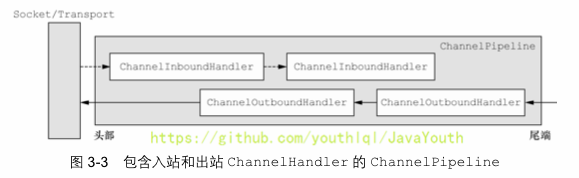 > 出站,入站如果搞不清楚,看下面的**Netty的handler链的调用机制**,通过一个例子和图讲清楚
## 编码解码器
1. 当 `Netty` 发送或者接受一个消息的时候,就将会发生一次数据转换。入站消息会被解码:从字节转换为另一种格式(比如 `java` 对象);如果是出站消息,它会被编码成字节。
2. `Netty` 提供一系列实用的编解码器,他们都实现了 `ChannelInboundHadnler` 或者 `ChannelOutboundHandler` 接口。在这些类中,`channelRead` 方法已经被重写了。以入站为例,对于每个从入站 `Channel` 读取的消息,这个方法会被调用。随后,它将调用由解码器所提供的 `decode()` 方法进行解码,并将已经解码的字节转发给 `ChannelPipeline` 中的下一个 `ChannelInboundHandler`。
## 解码器 - ByteToMessageDecoder
1. 关系继承图
> 出站,入站如果搞不清楚,看下面的**Netty的handler链的调用机制**,通过一个例子和图讲清楚
## 编码解码器
1. 当 `Netty` 发送或者接受一个消息的时候,就将会发生一次数据转换。入站消息会被解码:从字节转换为另一种格式(比如 `java` 对象);如果是出站消息,它会被编码成字节。
2. `Netty` 提供一系列实用的编解码器,他们都实现了 `ChannelInboundHadnler` 或者 `ChannelOutboundHandler` 接口。在这些类中,`channelRead` 方法已经被重写了。以入站为例,对于每个从入站 `Channel` 读取的消息,这个方法会被调用。随后,它将调用由解码器所提供的 `decode()` 方法进行解码,并将已经解码的字节转发给 `ChannelPipeline` 中的下一个 `ChannelInboundHandler`。
## 解码器 - ByteToMessageDecoder
1. 关系继承图
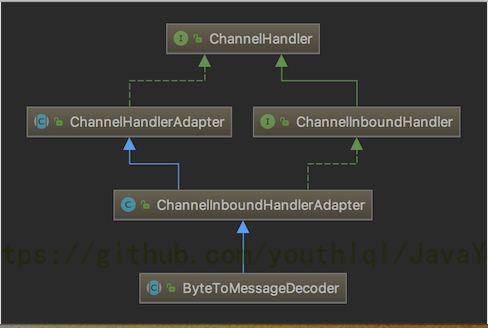 2. 由于不可能知道远程节点是否会一次性发送一个完整的信息,`tcp` 有可能出现粘包拆包的问题,这个类会对入站数据进行缓冲,直到它准备好被处理.【后面有说TCP的粘包和拆包问题】
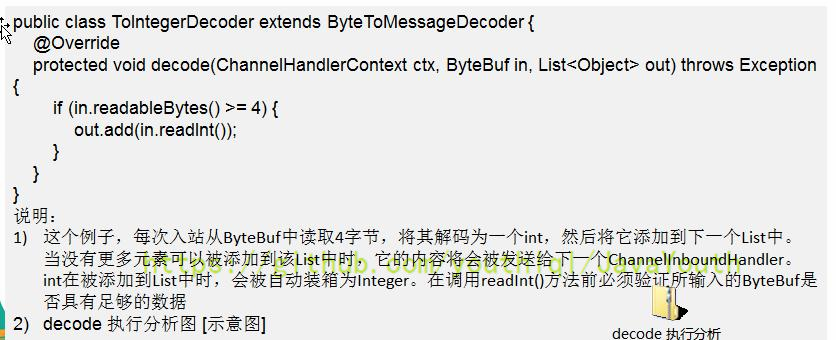
3. 一个关于 `ByteToMessageDecoder` 实例分析
2. 由于不可能知道远程节点是否会一次性发送一个完整的信息,`tcp` 有可能出现粘包拆包的问题,这个类会对入站数据进行缓冲,直到它准备好被处理.【后面有说TCP的粘包和拆包问题】
3. 一个关于 `ByteToMessageDecoder` 实例分析
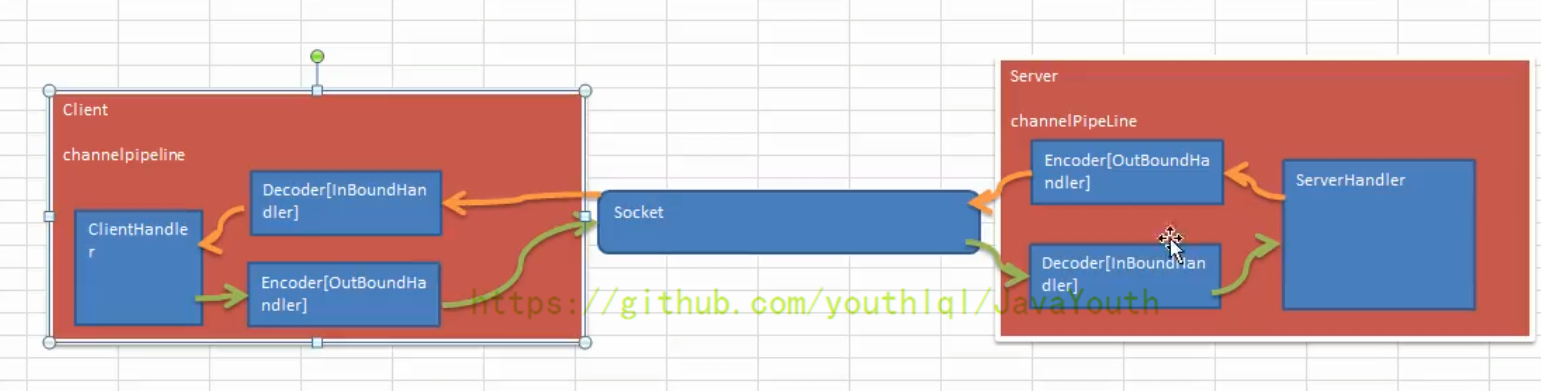
 ## Netty的handler链的调用机制
实例要求:
1. 使用自定义的编码器和解码器来说明 `Netty` 的 `handler` 调用机制
客户端发送 `long` -> 服务器
服务端发送 `long` -> 客户端
> 读者可以看下这个图,带着这个图去看下面的例子。
## Netty的handler链的调用机制
实例要求:
1. 使用自定义的编码器和解码器来说明 `Netty` 的 `handler` 调用机制
客户端发送 `long` -> 服务器
服务端发送 `long` -> 客户端
> 读者可以看下这个图,带着这个图去看下面的例子。
 ### MyServer
```java
package com.atguigu.netty.inboundhandlerandoutboundhandler;
import io.netty.bootstrap.ServerBootstrap;
import io.netty.channel.ChannelFuture;
import io.netty.channel.EventLoopGroup;
import io.netty.channel.nio.NioEventLoopGroup;
import io.netty.channel.socket.nio.NioServerSocketChannel;
public class MyServer {
public static void main(String[] args) throws Exception{
EventLoopGroup bossGroup = new NioEventLoopGroup(1);
EventLoopGroup workerGroup = new NioEventLoopGroup();
try {
ServerBootstrap serverBootstrap = new ServerBootstrap();
serverBootstrap.group(bossGroup,workerGroup).channel(NioServerSocketChannel.class).childHandler(new MyServerInitializer()); //自定义一个初始化类
ChannelFuture channelFuture = serverBootstrap.bind(7000).sync();
channelFuture.channel().closeFuture().sync();
}finally {
bossGroup.shutdownGracefully();
workerGroup.shutdownGracefully();
}
}
}
```
### MyServerInitializer
```java
package com.atguigu.netty.inboundhandlerandoutboundhandler;
import io.netty.channel.ChannelInitializer;
import io.netty.channel.ChannelPipeline;
import io.netty.channel.socket.SocketChannel;
public class MyServerInitializer extends ChannelInitializer {
@Override
protected void initChannel(SocketChannel ch) throws Exception {
ChannelPipeline pipeline = ch.pipeline();//一会下断点
//入站的handler进行解码 MyByteToLongDecoder
pipeline.addLast(new MyByteToLongDecoder());
//出站的handler进行编码
pipeline.addLast(new MyLongToByteEncoder());
//自定义的handler 处理业务逻辑
pipeline.addLast(new MyServerHandler());
System.out.println("xx");
}
}
```
### MyServerHandler
```java
package com.atguigu.netty.inboundhandlerandoutboundhandler;
import io.netty.channel.ChannelHandlerContext;
import io.netty.channel.SimpleChannelInboundHandler;
public class MyServerHandler extends SimpleChannelInboundHandler {
@Override
protected void channelRead0(ChannelHandlerContext ctx, Long msg) throws Exception {
System.out.println("从客户端" + ctx.channel().remoteAddress() + " 读取到long " + msg);
//给客户端发送一个long
ctx.writeAndFlush(98765L);
}
@Override
public void exceptionCaught(ChannelHandlerContext ctx, Throwable cause) throws Exception {
cause.printStackTrace();
ctx.close();
}
}
```
### MyClient
```java
package com.atguigu.netty.inboundhandlerandoutboundhandler;
import io.netty.bootstrap.Bootstrap;
import io.netty.channel.ChannelFuture;
import io.netty.channel.EventLoopGroup;
import io.netty.channel.nio.NioEventLoopGroup;
import io.netty.channel.socket.nio.NioSocketChannel;
public class MyClient {
public static void main(String[] args) throws Exception{
EventLoopGroup group = new NioEventLoopGroup();
try {
Bootstrap bootstrap = new Bootstrap();
bootstrap.group(group).channel(NioSocketChannel.class)
.handler(new MyClientInitializer()); //自定义一个初始化类
ChannelFuture channelFuture = bootstrap.connect("localhost", 7000).sync();
channelFuture.channel().closeFuture().sync();
}finally {
group.shutdownGracefully();
}
}
}
```
### MyClientInitializer
```java
package com.atguigu.netty.inboundhandlerandoutboundhandler;
import io.netty.channel.ChannelInitializer;
import io.netty.channel.ChannelPipeline;
import io.netty.channel.socket.SocketChannel;
public class MyClientInitializer extends ChannelInitializer {
@Override
protected void initChannel(SocketChannel ch) throws Exception {
ChannelPipeline pipeline = ch.pipeline();
//加入一个出站的handler 对数据进行一个编码
pipeline.addLast(new MyLongToByteEncoder());
//这时一个入站的解码器(入站handler )
pipeline.addLast(new MyByteToLongDecoder());
//加入一个自定义的handler , 处理业务
pipeline.addLast(new MyClientHandler());
}
}
```
### MyClientHandler
```java
package com.atguigu.netty.inboundhandlerandoutboundhandler;
import io.netty.buffer.Unpooled;
import io.netty.channel.ChannelHandlerContext;
import io.netty.channel.SimpleChannelInboundHandler;
import io.netty.util.CharsetUtil;
import java.nio.charset.Charset;
public class MyClientHandler extends SimpleChannelInboundHandler {
@Override
protected void channelRead0(ChannelHandlerContext ctx, Long msg) throws Exception {
System.out.println("服务器的ip=" + ctx.channel().remoteAddress());
System.out.println("收到服务器消息=" + msg);
}
//重写channelActive 发送数据
@Override
public void channelActive(ChannelHandlerContext ctx) throws Exception {
System.out.println("MyClientHandler 发送数据");
//ctx.writeAndFlush(Unpooled.copiedBuffer(""))
ctx.writeAndFlush(123456L); //发送的是一个long
}
}
```
### MyByteToLongDecoder
```java
package com.atguigu.netty.inboundhandlerandoutboundhandler;
import io.netty.buffer.ByteBuf;
import io.netty.channel.ChannelHandlerContext;
import io.netty.handler.codec.ByteToMessageDecoder;
import java.util.List;
public class MyByteToLongDecoder extends ByteToMessageDecoder {
/**
*
* decode 会根据接收的数据,被调用多次, 直到确定没有新的元素被添加到list
* , 或者是ByteBuf 没有更多的可读字节为止
* 如果list out 不为空,就会将list的内容传递给下一个 channelinboundhandler处理,
* 该处理器的方法也会被调用多次
*
* @param ctx 上下文对象
* @param in 入站的 ByteBuf
* @param out List 集合,将解码后的数据传给下一个handler
* @throws Exception
*/
@Override
protected void decode(ChannelHandlerContext ctx, ByteBuf in, List
### MyServer
```java
package com.atguigu.netty.inboundhandlerandoutboundhandler;
import io.netty.bootstrap.ServerBootstrap;
import io.netty.channel.ChannelFuture;
import io.netty.channel.EventLoopGroup;
import io.netty.channel.nio.NioEventLoopGroup;
import io.netty.channel.socket.nio.NioServerSocketChannel;
public class MyServer {
public static void main(String[] args) throws Exception{
EventLoopGroup bossGroup = new NioEventLoopGroup(1);
EventLoopGroup workerGroup = new NioEventLoopGroup();
try {
ServerBootstrap serverBootstrap = new ServerBootstrap();
serverBootstrap.group(bossGroup,workerGroup).channel(NioServerSocketChannel.class).childHandler(new MyServerInitializer()); //自定义一个初始化类
ChannelFuture channelFuture = serverBootstrap.bind(7000).sync();
channelFuture.channel().closeFuture().sync();
}finally {
bossGroup.shutdownGracefully();
workerGroup.shutdownGracefully();
}
}
}
```
### MyServerInitializer
```java
package com.atguigu.netty.inboundhandlerandoutboundhandler;
import io.netty.channel.ChannelInitializer;
import io.netty.channel.ChannelPipeline;
import io.netty.channel.socket.SocketChannel;
public class MyServerInitializer extends ChannelInitializer {
@Override
protected void initChannel(SocketChannel ch) throws Exception {
ChannelPipeline pipeline = ch.pipeline();//一会下断点
//入站的handler进行解码 MyByteToLongDecoder
pipeline.addLast(new MyByteToLongDecoder());
//出站的handler进行编码
pipeline.addLast(new MyLongToByteEncoder());
//自定义的handler 处理业务逻辑
pipeline.addLast(new MyServerHandler());
System.out.println("xx");
}
}
```
### MyServerHandler
```java
package com.atguigu.netty.inboundhandlerandoutboundhandler;
import io.netty.channel.ChannelHandlerContext;
import io.netty.channel.SimpleChannelInboundHandler;
public class MyServerHandler extends SimpleChannelInboundHandler {
@Override
protected void channelRead0(ChannelHandlerContext ctx, Long msg) throws Exception {
System.out.println("从客户端" + ctx.channel().remoteAddress() + " 读取到long " + msg);
//给客户端发送一个long
ctx.writeAndFlush(98765L);
}
@Override
public void exceptionCaught(ChannelHandlerContext ctx, Throwable cause) throws Exception {
cause.printStackTrace();
ctx.close();
}
}
```
### MyClient
```java
package com.atguigu.netty.inboundhandlerandoutboundhandler;
import io.netty.bootstrap.Bootstrap;
import io.netty.channel.ChannelFuture;
import io.netty.channel.EventLoopGroup;
import io.netty.channel.nio.NioEventLoopGroup;
import io.netty.channel.socket.nio.NioSocketChannel;
public class MyClient {
public static void main(String[] args) throws Exception{
EventLoopGroup group = new NioEventLoopGroup();
try {
Bootstrap bootstrap = new Bootstrap();
bootstrap.group(group).channel(NioSocketChannel.class)
.handler(new MyClientInitializer()); //自定义一个初始化类
ChannelFuture channelFuture = bootstrap.connect("localhost", 7000).sync();
channelFuture.channel().closeFuture().sync();
}finally {
group.shutdownGracefully();
}
}
}
```
### MyClientInitializer
```java
package com.atguigu.netty.inboundhandlerandoutboundhandler;
import io.netty.channel.ChannelInitializer;
import io.netty.channel.ChannelPipeline;
import io.netty.channel.socket.SocketChannel;
public class MyClientInitializer extends ChannelInitializer {
@Override
protected void initChannel(SocketChannel ch) throws Exception {
ChannelPipeline pipeline = ch.pipeline();
//加入一个出站的handler 对数据进行一个编码
pipeline.addLast(new MyLongToByteEncoder());
//这时一个入站的解码器(入站handler )
pipeline.addLast(new MyByteToLongDecoder());
//加入一个自定义的handler , 处理业务
pipeline.addLast(new MyClientHandler());
}
}
```
### MyClientHandler
```java
package com.atguigu.netty.inboundhandlerandoutboundhandler;
import io.netty.buffer.Unpooled;
import io.netty.channel.ChannelHandlerContext;
import io.netty.channel.SimpleChannelInboundHandler;
import io.netty.util.CharsetUtil;
import java.nio.charset.Charset;
public class MyClientHandler extends SimpleChannelInboundHandler {
@Override
protected void channelRead0(ChannelHandlerContext ctx, Long msg) throws Exception {
System.out.println("服务器的ip=" + ctx.channel().remoteAddress());
System.out.println("收到服务器消息=" + msg);
}
//重写channelActive 发送数据
@Override
public void channelActive(ChannelHandlerContext ctx) throws Exception {
System.out.println("MyClientHandler 发送数据");
//ctx.writeAndFlush(Unpooled.copiedBuffer(""))
ctx.writeAndFlush(123456L); //发送的是一个long
}
}
```
### MyByteToLongDecoder
```java
package com.atguigu.netty.inboundhandlerandoutboundhandler;
import io.netty.buffer.ByteBuf;
import io.netty.channel.ChannelHandlerContext;
import io.netty.handler.codec.ByteToMessageDecoder;
import java.util.List;
public class MyByteToLongDecoder extends ByteToMessageDecoder {
/**
*
* decode 会根据接收的数据,被调用多次, 直到确定没有新的元素被添加到list
* , 或者是ByteBuf 没有更多的可读字节为止
* 如果list out 不为空,就会将list的内容传递给下一个 channelinboundhandler处理,
* 该处理器的方法也会被调用多次
*
* @param ctx 上下文对象
* @param in 入站的 ByteBuf
* @param out List 集合,将解码后的数据传给下一个handler
* @throws Exception
*/
@Override
protected void decode(ChannelHandlerContext ctx, ByteBuf in, List